Monday, July 26, 2010

Technology, Natural Capital and The Natural Revolution

Technology and business have always coexisted in history, with new industries and business concepts connecting with technology and offering beneficial outcomes and new markets.

Examples of this in today's business world include the development of the Internet Web 2.0, mass production and international airline carriers.

Today, another new market is emerging around the world, called natural capital. It is beginning to pervade the investing landscape with serious talk of climate change business opportunities and ecological responsibilities.

Natural Capital


What is Natural Capital?

In economics, capital and capital goods are factors of production used to create goods or services that are not themselves significantly consumed (though they may depreciate) in the production process.

Natural capital is the extension of the economic notion of capital to goods and services relating to the natural environment.

Natural capital is the stock of natural ecosystems that yields a flow of valuable goods or services into the future.


The main resources of the natural capital market in the 21st century are:
  • Energy (electricity, fuel)
  • Water (clean, grey, waste)
  • Waste (sewage, carbon, uranium)
  • Recycleable Non Durable Consumption (Paper, ink, light bulbs) 
  • Recycleable Durable Consumption (maintenance, repairs)
  • Recycleable Human Consumption (packing, food, products)

The combination of technology and natural capital provides the ground work for a new type of economic revolution that will surpass the industrial revolution.

Technology is the state of the art of the whole field of practical know-how and tool use.

It therefore encompasses all that can be said about arts, crafts, professions, applied sciences, and skills.

The natural revolution is coming because the world's industrial technologies are beginning to become unprofitable or inefficient, due to constaints on resources and markets that are caused by environmental and social issues.

Wind Turbines for Green Power

The next part looks at the key concepts in the natural revolution and definitions of the ideology.

It compares the ideas of the last 200 years of the industrial revolution to the demands of the evolving natural revolution of the 21st century.

 
Industrial Revolution - the revolution the world needed

The Industrial Revolution was a period in the 18th and 19th centuries when major changes in agriculture, manufacturing, mining, and transport had a profound effect on the socio-economic and cultural conditions of the world.

The onset of the Industrial Revolution marked a major turning point in human history; almost every aspect of daily life was eventually influenced in some way.

Main points of the Industrial Revolution:
  • Increased worker productivity output by 100 fold.
  • Created conditions for a consumerist society.
  • Natural resources were plentiful. (Natural capital)
  • Productivity was measured in part by how many boats you had for fishing; or how many chainsaws you owned for forestry.
  • Human resource capital became a less important part of profits. (e.g. the end of slavery)
  • Technology was a significant factor in the industrial revolution.

Industrial Revolution


Natural Revolution - the revolution the world needs now

The Natural Revolution refers to a hypothetical series of research, development, and technology transfer initiatives, to improve the industrialised or technology driven natural capital production of the world.

The initiatives involved in the development of the Natural Revolution include carbon reduction, waste recycling , and efficient farming practices, to name a few.

Main points of the Natural Revolution: 
  • Natural resource productivity will increase by a 100 fold.
  • A continuation of a consumerist ideas.
  • Natural resources not limitless. (Natural Capital)
  • Productivity is now measured by how many fish you have in the sea, not how many boats, and how many trees are in a forest, not how many chainsaws you have.
  • Natural capital use must become more efficient (e.g. oil, fresh water, and soil).
  • Technology will be a large influence in the natural revolution.


What does this mean for Individuals and Organisations?

For individuals and organisations to adjust to the changing environmental and public concerns, there will be legal requirements and operational efficiency improvements.

Natural Capitalism and technology innovation offers a logical way for people and organisation to reorganise and adapt to these new economic and social changes in our modern society.

A good example of an emerging Natural Capitalist economy and country is the Maldives, where President Mohamed Nasheed is championing climate change awareness, carbon trading and environmental harm minimisation. 

With regard to the threat posed to the very low-lying islands by changes in sea level caused by global warming, in March 2009, President Nasheed pledged to set an example by making the Maldives carbon-neutral within a decade by moving to wind and solar power.

He argued that the cost of the change would be no higher than what the Maldives already spends on energy.

As part of a wider campaign by international environmental NGO 350.org's campaign publicising the threats from climate change and its effects on the Maldives, Nasheed presided over the world’s first underwater cabinet meeting on 17 October 2009, off the island of Girifushi with his ministers meeting underwater in scuba diving gear.

The end result of applying innovative technology and natural capitalism to the world will be the start of the Natural Revolution. The Maldives and other smart countries are moving ahead of the environmental curve and applying natural capital ideas to develop their countries.

  • Saving on natural capital is good for your organisations' mid and long-term bottom lines.
  • The sooner your organisation starts thinking about natural capital, the less painful it will be in the future.
  • This will be eventually mandated by governments. (carbon trading, environmental laws etc.)
  • Natural capital will become increasing expensive in the future, due to scarcity, environmental impacts and increased population.
  • Technology will play a large influence in the natural revolution.

A green planet by natural capitalism

Individuals, business and organisations have to change the way they operate and by increasing their efficiency with the natural capitalism ideology.

Combining technology and natural capitalism is the best way to accomplish this for a green planet and to kick start the global natural revolution.

Saturday, July 24, 2010

Technical References Collection now Avaliable on Scribd

Burning the Midnight has added a new section to its Scribd profile, called Technical References.

It contains many useful documents and wall sheets for wireless, electronics and network technologies.

Handy to have hanging in the laboratory or workshop for a quick reference:
http://www.scribd.com/burningthemidnight

Resistor colour codes

Publications include:
  • Motorola Canopy Reset Default Plug
  • Radio Transmitter Power dBm to Watt Conversion Table
  • IP Subnet Reference Sheet
  • JEDEC Coding System Table for Diodes and Transistors
  • Serial Console Cable Howto and Wiring Diagram
  • Ami Bios Beep Codes Reference
  • Optical Fibre Connector Reference Sheet
  • Electronic Formulas
  • Resistor Colour Value Howto and Code Sheet
  • Ceramic and Mylar Capacitor Value Howto and Code Sheet

Technical References

Check them out at http://www.scribd.com/burningthemidnight in the Technical References section of the Burning the Midnight profile.

Also, the Technical Reviews section on Scribd has a lot of information on wireless, networking and security hardware systems.

Well worth a look.

VMware Server 2 - Part 3 - Mounting an ISO image on a Datastore

Mounting ISO images onto your virtual machine can be very handy for installation and management.

It removes the need for a physical CD/DVD drive to run the installation CD, upgrades and resource packages for the virtual machine.
VM Server Logo - Copyright VMware

Using ISOs for Installing Guest Operating Systems

A handy way to make it easier to install a guest operating system, is to use ISO images from the datastore as virtual CD/DVD drives.

In this example, the Slackware Linux 13.1 DVD ISO image will be downloaded to the ISO datastore and used for the guest installation.


cd /vmware/iso/   (Pre-mounted datastore directory)
wget http://www.slackwaremirror.com/slackware-13.1-install-dvd.iso


Then the rest is done from the VM Server 2 web console.

To install from an ISO image instead of a physcial CD/DVD drive, there is only a slight difference between the standard guest installation covered in part-1 and installing from an ISO image. (For larger views of the pictures, just click the image.)


VMware Server ISO Config

VMware Server ISO Config

In the virtual machine installation wizard, the part the concerns the ISO images is the "CD/DVD Drive" options.

In this screen, selecting the option "Use an ISO Image" will allow the user to have a virtual drive instead.

On the next wizard screen, the browse selector allows the adding of the ISO image on the server datastore.


VMware Server ISO Config

Click  browse and the datastore selection window appears.

Browse to the ISO datastore and select the slackware-13.1-install-dvd.iso image to use as the virtual drive.

After hitting OK, the original CD/DVD properties screen appears with the correct path to the ISO image. 

Follow the rest of the wizard as if you were installing a standard virtual machine on the server.

Once the wizard is finished, starting the guest OS from the console will start the installation of the OS from the bootable Slackware Linux ISO image.

Install as per normal. 


Changing the Virtual CD/DVD Drive ISO Image

After installing a guest operating system, you may want to mount another ISO image for upgrades of operating systems or installing other applications.

VMware Server ISO Config

To change the ISO image, go to the console and stop the virtual machine.

Under the summary section of the virtual machine's console tabs, in the hardware panel, select the "Edit" option under the CD/DVD Drive subsection to bring up the CD/DVD drive options window.


In this window, the user can select the connection as a ISO image in the radio buttons.

Click browse to select the ISO image from the server datastore.

Once the image is selected, click OK and re-power the virtual machine to have access to the new CD/DVD image.

Now the user is ready to run the application install CD/DVD or operating system upgrade disc.


VMware Server ISO

Mounting ISO images as virtual CD/DVD drives is very handy, and means you don't have to maintain a store of discs.

But wait, there is more to come in "VWware Server 2 - parts 4 and 5" of the blog.

I talk about monitoring the server, changing system resources and clustering the VMware server, among other things VM technical.

Stay tuned...

Thursday, July 22, 2010

Building an Industrial Robot - Part 1 - The Robot Brain and Body

Here's my project to make a universal platform for industrial robot experiments.

The requirements are to develop and construct an industrial grade tracked robot for under US$2000.

The robot has to be able to work in harsh environments, be net-workable and operate for long periods before recharging.


A series of blogs will follow the progress of the tracked robot project, and this part is focused on the base construction and layout of the robot's computer.


The Robot's Main Body

Before you mount a computer brains for a robot, you need a body to mount it, so I created a quick, cheap and strong assembly method.

Robot's main body
Side of the robot without the hatch

Robot's main body
Top of the robot without the hatch

The main body is made of poly carbonate panels with aluminium framing for lightness and strength.

The panels are glued to the aluminium frame with silicon, the same way you would build a fishtank.

This makes construction of a robot body easy, without too much drilling and reducing the number of bolts or rivets that might come lose during the robot's operation.

Also, construction makes the robot's main body water-proof, in case it has to operate in low level water.

The main body has been sprayed with a grey primer and matt black finishing paint to protect the polycarbonate body and increase water-proofing.

It also gives stealth or a black ops look to the robot.


Robot's main body
Side view with the hatch on

Robot's main body
Top view with the hatch on

With the top hatch and soft mounts on, the main body is sealed for protection of the robot's computer systems.

The GPS is mounted on the top, next to the 2.4 GHz omnidirectional antenna.

The pole mount at the other end of the main body is for the web cam.

In the centre, the main hatch opens to access the computer system for system reprogramming, battery maintenance and internal repairs.


The Robot's Computer
The main brain of the robot will be driven by a Mini-ITX system running Linux.

The Mini-ITX system will be using a SSD to boot  and run, which removes the requirement for a hard drive that might be damaged when the robot is in motion.

The idea behind the Mini-ITX is to reduce complexity from hardware into software tasks, and making the programming and design of the robot's brains much easier.

Mini-ITX Motherboard

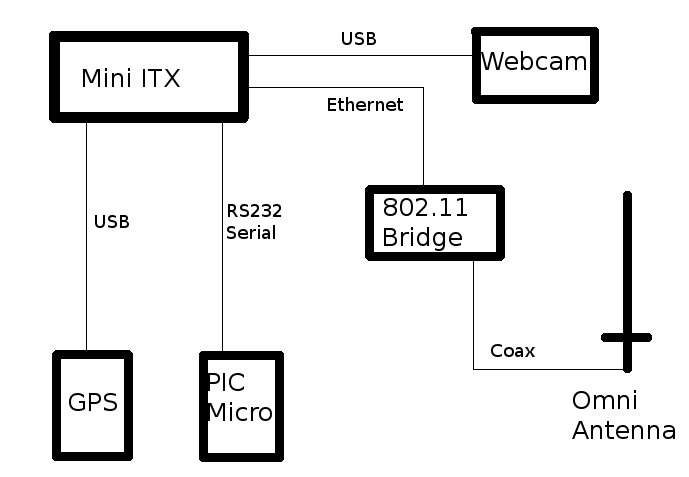
The main part of the robot lies in the PIC Micro-controller connected to the Mini-ITX by a RS232  connection.

This controller has 20 inputs and outputs for driving motors and reading sensors.

The PIC Micro-controller allows the software on the Mini-ITX to interface with the robot's outside world.


The 802.11g Linksys bridge is set to connect to the local access point for remote access to the robot via IP, either for the information of a remote user or for the robot to download new information and instructions.

The network security is done by WAP encryption on the layer 2 as well as 256 AES VPNs from the Linux OS.

802.11 Wireless Bridge

The Webcam and GPS are plugged straight into the Mini-ITX via USB cables.

This supplies the robot's computer with GPS positioning and a digital eye for navigation.

Computer Layout Components:
  • Mini-ITX computer
  • 802.11g Ethernet Bridge
  • USB GPS
  • USB Webcam
  • 2.4 GHz Antenna
  • Pic Micro-controller Board
  • USB, RS232, Cat5 and Coax cabling
Computer system for the robot
The Robot Computer Layout

The above diagram show the logic layout of the connections and hardware used for the computer controller.

The Mini-ITX connections use Cat5 to the 802.11 bridge, RS232 to the PIC Micro-controller and USB to the web cam and the GPS.

The 802.11 bridge is also connected to an antenna with shielded coaxial cable.

The choice of operating system for this robot project is Gentoo Linux.

I have found this Linux distribution ideal for embedded and custom designed systems.

It is very easy to make live images and small OS footprints with Gentoo Linux.

I have tested Gentoo Linux on Mini-ITX systems before without any issues.
Gentoo Linux Logo - Copyright Gentoo Linux

More to come in the next parts of this project, as we examine the power system, track design, motor systems and software applications required.

Burning the Midnight now on Twitter and Google Friend Connect

If you think you can escape this blog by leaving the computer, exiting the room and locking the door - you are wrong.

This site now updates twitter to send you twits anywhere you go.

Follow Burning the Midnight on twitter at  http://twitter.com/burnthemidnight
Twitter Logo - Copyright to Twitter

Subscribe to get the latest blog updates on your mobile phone or wireless computer. Why? Just because you can...
You can also join our blogger site by clicking on the Google Friend Connect menu at the right side of this blog.

Become a Midnight Follower and support our blog.

Google Logo - Copyright Google

Maldives Future in Space


The Maldives could have a future in space with the right people leading the way. Giving the Maldives a profitable industry, bring technology to the atolls and educating people in a growing industry.

The Maldives location and climate are favorable for launch operations. The atolls are strong enough for launches and a sea-ward launch is very simple, as the Maldives is a good distance from any large land masses.

Land based atoll launch facility


Some Reasons Why the Maldives would be a good place for a Space Centre.

1) Launch Location:
The Maldives is located in the middle of the Indian Ocean straddling the equator - a perfect launch position. There are several advantages of a Maldives based, equatorial launch over most other countries land-based launch facilities:
  • The rotational speed of the Earth is greatest at the equator, providing a minor extra launch "boost".
  • The need for a "plane change" to the zero degree inclination of geostationary orbit is eliminated, providing a major extra launch "boost". The same rocket launched from Cape Canaveral at 28.5 degrees north latitude would lift 15%–20% less mass to geostationary orbit.
  •  Any orbital inclination could be reached, thus (for example) combining in one launch site the attainable inclinations of both Cape Canaveral and Vandenberg.

    2) Maldives Climate:

    The Maldives average rainfall is on par with other major launch sites with only 2,500 (100 in) of annual rainfall.

    India's launch site at Sriharikota Island annual rainfall averages about 2,500 mm (100 in) and NASA's  Florida site averages about 2,159mm (85 in) per year.
    Sea based atoll launch facility

    3) Security and Safety:
    Remote atoll groups, surrounded by large seas, allow for excellent launch site security and safety.

    • An ocean-ward launch reduces risks related to launching over populated areas, providing better safety to third parties.
    • Absence of range conflicts with other launch systems and a near total absence of ship or overhead air traffic that would constrain launch.
    • Maldives has friendly governmental relationships with India. USA, Russia, China and Europe. All the major space players.

    Space Station

    It would be nice to see a space centre and launch facility in the Maldives in the next 5-10 years.  I am sure the Indian and USA space programs would be interested in investing in the Maldives on space projects. With the right direction and focused work, maybe the next place for Maldivans is in the stars themselves. 

    Wednesday, July 21, 2010

    VMware Server 2 - Part 2 - Application Virtual Machines


    Application Virtual Machines

    For the people who want a virtual machine up and running without hassles, there are application virtual machines which can be installed within a few minutes.

    A variety of pre-packaged applications are available. In fact, far too many to mention here.

    A good resource for application VMs is the VMware appliance marketplace:
    http://www.vmware.com/appliances

    WMware Application Virtual Machines


    Installing an Application VM

    For this example, I am using the SugarCRM application from Bitnami. It is a free download from their website:
    http://bitnami.org/stack/sugarcrm.

    This test uses the OpenSUSE 11.1 version for the installation.

    cd /vmware/test  (or your own datastore)
    wget http://bitnami.org/files/stacks/sugarcrm/6.0.0-0/bitnami-sugarcrm-6.0.0-0-opensuse-11.1.zip
    unzip bitnami-sugarcrm-6.0.0-0-opensuse-11.1.zip

    All ready and done, with the vmdk files in the pre-set-up datastore.

    Now to install the application VM into the VMware server.


    Setting up the VM 

    There is only a few things that are done differently when installing an application virtual machine. (Click the images for larger versions of the examples).

    VMware configuration screen

    VMware configuration screen

    As with creating a VM in part-1, you select the datastore you want to use and the VM's name.

    For this example, the test datastore will be used again for the VM files.

    On the next screen of the wizard, the correct OS for the application VM needs to be selected for the application to work.

    In this case, the selection is SUSE Linux. This will suit the SugarCRM application requirements.

    VMware configuration screen

    VMware configuration screen

    Moving on to the most important part in the wizard.

    This time, instead of creating a new disk, to run the application VM, the image can be selected by "Use an Existing Virtual Disk" option.

    VMware configuration screen

    VMware configuration screen

    This will give the ability to browse the datastores for the downloaded vmdk files.

    Browse to the correct datastore and select the SugarCRM vmdk file for SUSE Linux.

    Then after pressing the OK button, the drive configuration screen will appear again with the application VM in the browse field.

    For the rest of the installation of the application virtual machine, the configuration wizard follows the same path as installing VMs in part-1 of this blog.

    VMware configuration screen


    To start the application VM, go to the console tab and click on the play icon.

    Once started, click the console screen again to launch the application VM display to gain access to the virtual machine.


    VMware configuration screen

    Now there is a nice copy of SugarCRM running on the VMware Server.

    All ready for set-up and deployment by Internet to a client's office VPN or for a personal CRM software system for in-house work.

    And all installed in under 5 minutes.

    But wait, there is more to come in "VWware Server 2 - parts 3 and 4" of the blog.

    I talk about mounting ISO images and clustering the VMware server, among other things VM technical.

    Stay tuned...